
One shared codebase can make iOS and Android app development feel simpler, but it isn’t automatically the best fit for your product. If you’re weighing one cross-platform app against two native apps, look beyond build speed: the choice can shape how the experience feels on each device, which features you can use, and how the product can grow.
There’s no blanket winner between native and shared code. The right approach depends on what your app needs to do, how closely it should follow each platform’s conventions, and where you need flexibility as the product evolves. This guide explains the options, compares their trade-offs, and offers practical questions to resolve early so design and engineering work toward the same product goals.
Key Takeaways
- Native apps use platform-specific tools and conventions, while cross-platform development shares some code across iOS and Android.
- Compare interface needs, platform features, code reuse, and maintenance against your product requirements rather than relying on framework labels.
- For iOS and Android app development, start by defining your users, prioritising essential features, and assessing integrations.
- Separate launch requirements from future possibilities to choose an approach that fits now without over-engineering.
- Connect discovery, UI/UX design, engineering, testing, and deployment so the app experience stays aligned with product goals as scope evolves.
IOS and Android app development: what does building for both platforms involve?
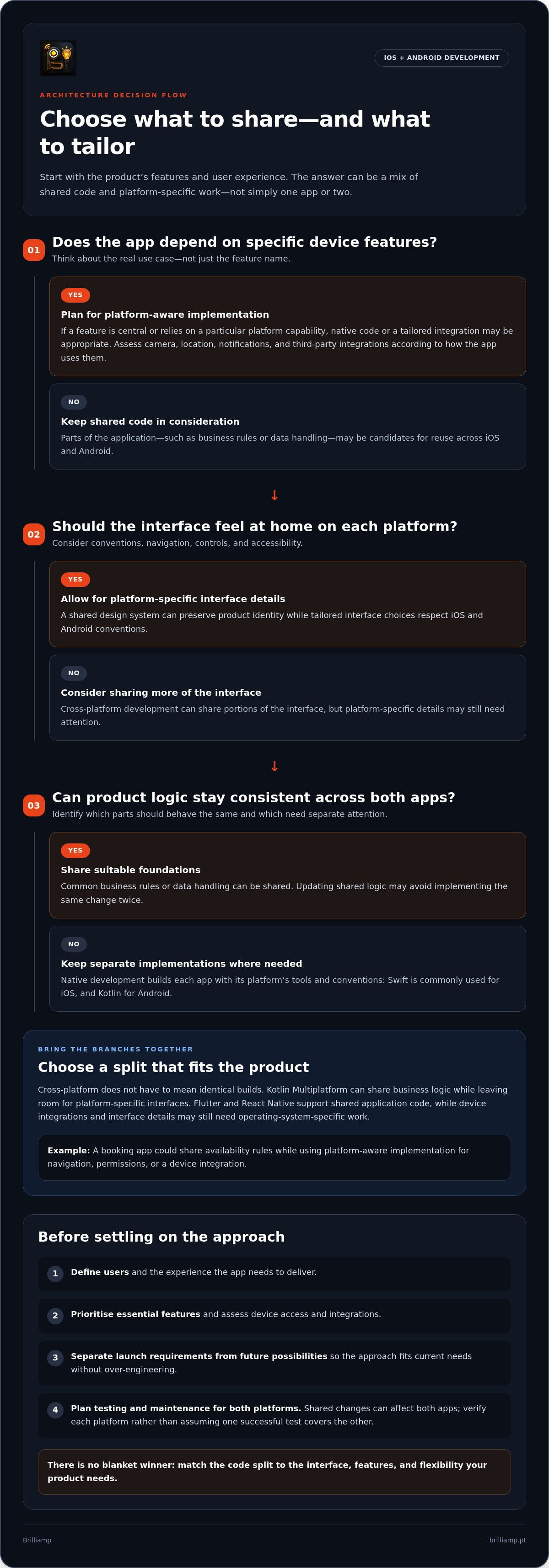
Building for both platforms means deciding what should be tailored to iOS and Android and what can be shared. Native development builds each app with platform-specific tools and conventions. Cross-platform development shares some code between the two, while still allowing for platform-specific interfaces and integrations.
Native development creates separate iOS and Android apps using each platform’s own technologies, while cross-platform development reuses part of the codebase. Both approaches involve the full mobile app development process, from shaping the experience to building, testing, and releasing it.
What does native iOS and Android development mean?
Native apps are built with tools and languages designed for their platform. Swift is commonly used for iOS development, while Kotlin is commonly used for Android. Working directly with platform capabilities and conventions can be useful when an app depends on specific device features or needs a closely tailored interface.
Separate implementations still need one coherent product vision. Design decisions, feature behaviour, and release planning must stay coordinated across both apps. Each app also needs ongoing testing and maintenance as the product and platforms evolve.
What does cross-platform app development mean?
Cross-platform frameworks let teams share parts of an application codebase across iOS and Android. Shared parts might include business rules, data handling, or portions of the interface. Reusing code can reduce duplication, but it doesn’t automatically create identical builds or remove platform-specific work.
Kotlin Multiplatform, Flutter, and React Native illustrate different ways to structure shared code. Kotlin Multiplatform can share business logic while leaving room for platform-specific interfaces. Flutter and React Native support shared application code, yet device integrations and interface details may still need work tailored to each operating system.
Consider a booking app. Its availability rules could be shared, while navigation, permissions, or a device integration may need platform-aware implementation. The right split depends on the features and the experience the app needs to deliver.
So, “one app or two?” isn’t always a literal choice between a single identical build and wholly separate products. iOS and Android app development can combine shared foundations with distinct interface or integration work. The useful question is which parts should stay consistent and which should feel at home on each platform.
How native and cross-platform app development shape the product
Architecture affects more than how code is organised. It can shape how naturally an interface fits each platform, how developers connect device features, and how changes are tested and maintained. IBM’s overview of native and hybrid apps offers helpful context, but the right choice depends on your product’s experience and technical requirements.
Shared code can reduce duplicated effort, but it doesn’t eliminate platform-specific interface, integration, testing, or maintenance work. A framework label alone can’t guarantee better performance or a more polished app. Those outcomes depend on implementation, the features involved, and how carefully the product is designed for its users.
User experience and access to device features
People bring familiar expectations to each platform. Navigation, controls, notifications, and accessibility behaviours should feel clear and usable on both iOS and Android. A shared design system can keep the product’s identity consistent, while platform-specific details help the experience feel at home on each device.
Assess device features against real use cases. Camera access, location, notifications, and third-party integrations can be handled in different architectures, but their complexity depends on how the app uses them. If a feature is central to the product or relies on a particular platform capability, native code or a tailored integration may be appropriate. Prototype and test important interactions early, especially when permissions or accessibility needs affect the user journey.
Code reuse, testing, and long-term maintenance
Sharing common product logic can make some changes easier to apply consistently. For example, updating business rules in one shared layer may avoid implementing the same change twice. But code reuse doesn’t remove all platform-specific work. Interfaces, integrations, and edge cases may still need separate attention.
Both approaches need a deliberate quality and maintenance plan. Test on relevant devices and operating-system versions, and account for release coordination, dependency updates, and platform-specific fixes. A change to a shared component can affect both apps, so verify each platform rather than assuming one successful test covers the other.
- Interface: keep the product recognisable while respecting platform conventions.
- Features: assess device access and integrations according to their importance and complexity.
- Ongoing work: plan for testing, updates, and fixes across both platforms.
In iOS and Android app development, discovery and UI/UX design can help clarify these trade-offs before architecture decisions become costly to change. Explore mobile app design and development as connected parts of shaping a cohesive product.
Native vs cross-platform app development: compare the trade-offs
Neither approach wins by default. Native development gives each platform its own implementation; cross-platform development shares selected parts of the codebase. The best fit depends on what users need to do, the device capabilities involved, and how the product is expected to evolve.
| Consideration | Separate native apps | Cross-platform approach |
|---|---|---|
| User experience | Each app can be shaped closely around its platform’s conventions. | A shared experience can be adapted with platform-specific interface details. |
| Code sharing | Most app code is developed separately for iOS and Android. | Some application code can be shared, depending on the framework and architecture. |
| Platform-specific work | Built into each platform’s implementation. | May still be needed for interfaces, device features, or integrations. |
| Potential product fit | Useful when platform-specific interactions or capabilities are central. | Worth assessing when core workflows are shared across both platforms. |
Cross-platform doesn’t automatically mean one build with no platform-specific work. Likewise, two native apps aren’t automatically more polished or performant. Estimates depend on feature scope, integrations, design requirements, testing coverage, and release needs. Compare the work involved, not just the architecture label.
When separate native apps may fit better
Native development may suit products where the user experience depends on platform-specific interactions, deep operating-system integrations, or capabilities that need precise access. It also lets each app follow its platform’s conventions closely. The trade-off is coordinating design, implementation, testing, and ongoing changes across two codebases.
When a cross-platform approach may fit better
A cross-platform approach may suit products where the apps share substantial workflows and a similar core experience. Shared code can help teams coordinate changes to common product logic across both platforms, but framework capabilities and project requirements determine how practical that is. Interfaces and integrations may still call for tailored work.
For iOS and Android app development, use product discovery to map essential features and platform-specific needs before comparing estimates. That makes the trade-offs visible: what can be shared, what needs individual attention, and which work matters most for launch.
How to choose an iOS and Android development approach
Make the architecture decision from the product outward. Start with what users need to accomplish, then identify which features shape the experience on each platform. This keeps the first release focused and gives design and engineering clear requirements to work from.
Use four steps to shape the decision
- 1. Define your users and journeys. Identify who the first release serves and the essential tasks they need to complete. Sketch the main flows, such as signing up, searching, booking, or making a payment.
- 2. Prioritise launch features. Separate must-have functionality from ideas for later releases. A future feature may influence the product roadmap, but it doesn’t automatically need to shape the first architecture.
- 3. Assess integrations and platform needs. Flag features that rely on camera, location, notifications, or other operating-system capabilities. Include accessibility, security, analytics, and external integrations in the requirements, and identify where the experience may need platform-specific treatment.
- 4. Compare approaches against the work. Weigh the required user experience, shared workflows, platform-specific implementation, device testing, and maintenance. Choose based on the app’s real scope, not on assumptions that one approach is always faster or simpler.
Turn requirements into a practical architecture
Translate the feature list into a delivery plan. Decide how the interface will be designed for both platforms, which devices and operating-system versions need testing, and how app-store submission and release coordination will work. Include analytics from the start so the team can understand how people use the product after launch. Shape security requirements around the app’s data, accounts, and integrations.
Keep launch needs distinct from future possibilities. For example, if an advanced integration is only a roadmap idea, record it as a future consideration rather than building around it before its role is clear. At the same time, make deliberate decisions about foundations that would be difficult to change later, such as how core workflows and data are organised.
This is a product decision as much as a technical one. If you’re shaping the project with a development partner, read Mobile App Development Agency: Find the Right Product Partner for guidance on aligning expertise, collaboration, and goals. Brilliamp connects discovery, UI/UX design, engineering, and launch as parts of the same process. Learn more about Brilliamp’s mobile app development.
From app approach to a polished iOS and Android launch
Choosing an architecture is a starting point, not a decision detached from the product. As features and user needs develop, the approach should continue to support the experience you’re building. A joined-up process keeps discovery, design, engineering, testing, and deployment connected, so early decisions can be refined as the scope takes shape.
Connect product design with engineering
Start with research into users and their needs, then translate what you learn into clear journeys, wireframes, and interactive prototypes. These help the team explore how a person moves through the app before committing to detailed implementation. Testing a prototype can reveal confusing steps or missing states while changes are easier to make.
A design system helps keep visual elements and interaction patterns coherent across iOS and Android, while leaving room for platform-specific details. Engineering input belongs in this stage too. Feedback on integrations, device capabilities, and architecture can help refine designs before they become costly to change. That collaboration links a considered interface to a build that can support it.
Plan for release and what comes after
Testing checks that key journeys work across the platforms and devices the product needs to support. App-store deployment then brings the experience to users, while analytics can help the team understand how people engage with it. Those observations create a feedback loop: use what you learn to prioritise improvements, refine the experience, and guide post-release growth work.
In iOS and Android app development, the process should keep product goals in view as scope evolves. Brilliamp brings UI/UX research, design, engineering, deployment, analytics, and post-release support into an end-to-end mobile app development process, connecting the experience on screen with the work required to launch and improve it.
A focused discovery and design process helps clarify essential features, platform-specific needs, and the right scope for launch. Brilliamp’s end-to-end approach brings those decisions together with engineering, testing, deployment, and post-release growth support.
Build the app around the experience you want to create
The right choice for iOS and Android app development comes down to your product’s needs, not a blanket preference for one codebase or two. Native apps can give platform-specific features and interactions more direct attention, while cross-platform approaches can share parts of the application. Neither removes the need to plan for design, testing, and ongoing updates across both platforms.
Start with your users and the essential journeys for launch. Then assess which features need platform-specific work, what can be shared, and how the product may evolve. A clear discovery and design process helps turn those priorities into an approach that connects a polished user experience with practical engineering.
Brilliamp brings mobile app development from UI/UX design through deployment into one connected process. Request a free consultation with Brilliamp and receive a project proposal within 24 hours to clarify your product’s needs and shape the next steps.
Frequently Asked Questions
Is it better to build separate native iOS and Android apps?
Not necessarily. Separate native apps can suit products that rely on platform-specific interactions, device capabilities, or deep operating-system integrations. They also allow each interface to follow its platform’s conventions closely. The trade-off is coordinating development, testing, releases, and maintenance across two codebases. If your app’s core workflows are similar on both platforms, compare native development with cross-platform options against your actual features and product goals.
Can one app work on both iOS and Android?
Yes. Cross-platform development can share parts of an application’s code across iOS and Android, helping teams build common product logic for both. “One app” doesn’t always mean one identical build or interface: platform-specific design details, integrations, and device features may still need separate work. The amount of shared code depends on the framework, app requirements, and how the product is structured.
What is the difference between native and cross-platform app development?
Native development builds an app for each operating system using its platform-specific tools and conventions, commonly Swift for iOS and Kotlin for Android. Cross-platform development uses frameworks to share some code between the platforms. That shared code might cover business logic or parts of the interface, while other elements remain tailored. Both approaches need product design, testing, and ongoing updates for each platform.
Does cross-platform app development limit features or performance?
Not automatically. Cross-platform frameworks can support a wide range of app experiences, but the fit depends on the framework, implementation, and features required. Device capabilities or complex operating-system integrations may need platform-specific code or additional engineering. Performance also depends on how the app is built and what it does, so don’t assume a framework alone guarantees a particular result. Assess critical features early and test them on relevant devices.
How do I choose between native and cross-platform development?
For iOS and Android app development, begin with users and the essential journeys your first release must support. List features that depend on device capabilities or integrations, then distinguish launch requirements from future ideas. Compare approaches based on interface needs, shared functionality, engineering scope, testing, releases, and maintenance. This makes the decision about product fit rather than a blanket claim that one architecture is always faster, cheaper, or better.
Do iOS and Android apps need separate testing?
Yes. Even when an app shares code, test its iOS and Android builds separately on relevant devices and operating-system versions. Check core user journeys, interface behaviour, accessibility, permissions, notifications, and important integrations on both platforms. Shared logic may reduce duplicated implementation, but it doesn’t prove that each platform behaves correctly. Include testing in release planning, and retest platform-specific fixes or changes that affect shared components.
Can a startup launch on both iOS and Android with an MVP?
Yes. A startup can launch an MVP on both platforms by focusing the first release on a small set of essential user journeys and choosing an architecture that supports them. Define must-have features, assess platform-specific requirements, and leave lower-priority roadmap ideas for later. A shared-code approach may suit overlapping workflows, while native development may fit requirements needing deeper platform customisation. The right scope depends on the product and its users.


