

What if your business doesn’t need a bigger digital product, but a clearer way for people to get things done? Custom web application development can turn a specific workflow into an interactive tool. The decision to build one starts with defining the problem, not adding features.
It’s easy to blur the lines: a website shares information, a web application helps users complete tasks, and off-the-shelf software provides ready-made functions. A tailored solution can make sense when existing tools don’t fit the way your team or customers need to work. That doesn’t mean building everything at once. A focused first version can test the core idea before complexity grows.
This guide explains what makes a web application custom, when one may suit your business, and how user needs inform design and technical choices. You’ll also learn what to expect from discovery and planning through design, development, launch, and post-release learning. The aim is to shape a useful solution around a real need without building more than you need.
Key Takeaways
- Recognise when an app’s interactive features go beyond what a brochure-style website is designed to do.
- Trace how a user action moves through an interface, application logic, data, and integrations to produce a result.
- Compare custom web application development with existing software by assessing workflow fit, flexibility, integrations, and ongoing responsibility.
- Keep a project grounded in a real user need, from discovery and design through development, testing, and launch.
- See how research-led UI/UX design, engineering, analytics, and post-release learning can shape a product as user needs evolve.
What Is Custom Web Application Development, and What Does It Build?
A custom web application is an interactive browser-based tool designed around a particular user need or business workflow. Unlike a brochure-style website, which mainly presents information, it lets people take actions, work with data, and complete tasks online.
That might mean customers booking appointments, clients checking progress in a portal, or staff reviewing a dashboard instead of assembling updates manually. Users access these tools through a browser and may sign in to see information or features suited to their role. The broader idea of a web application is an application accessed over a network through a browser.
How is a web application different from a website?
The distinction is about what visitors come to do, not a strict technical boundary. Informational pages help people understand a business, explore services, or find contact details. An application helps them act, such as submitting a request, managing an account, or tracking a process.
Both can share a domain, brand, and visual design. A company website might explain a service while a customer portal on the same domain lets clients view documents or update details. Ask what the visitor needs to accomplish: read and understand, or use a tool to complete a task?
What makes a web application custom?
In custom web application development, the experience is shaped around a defined product need. The team considers who will use it, what each person needs to do, and how the workflow should behave. Those decisions affect features, screen layouts, account permissions, and the rules that determine what happens after someone takes an action.
For example, a booking tool might need to reflect a business’s appointment process, while an internal workflow app could route requests to the right team. Integrations can pass information between the application and other systems. The goal is to make the tool fit the work, rather than forcing users to reshape every step around generic software.
Custom doesn’t automatically mean large or complicated. A focused app may handle one recurring task especially well; a broader product may support several user roles and connected workflows. Start by describing the task, the people involved, and the outcome they need. Then shape the smallest useful set of features around it, so each design and technical decision has a practical purpose.
How Custom Web Application Development Connects Design, Data, and Code
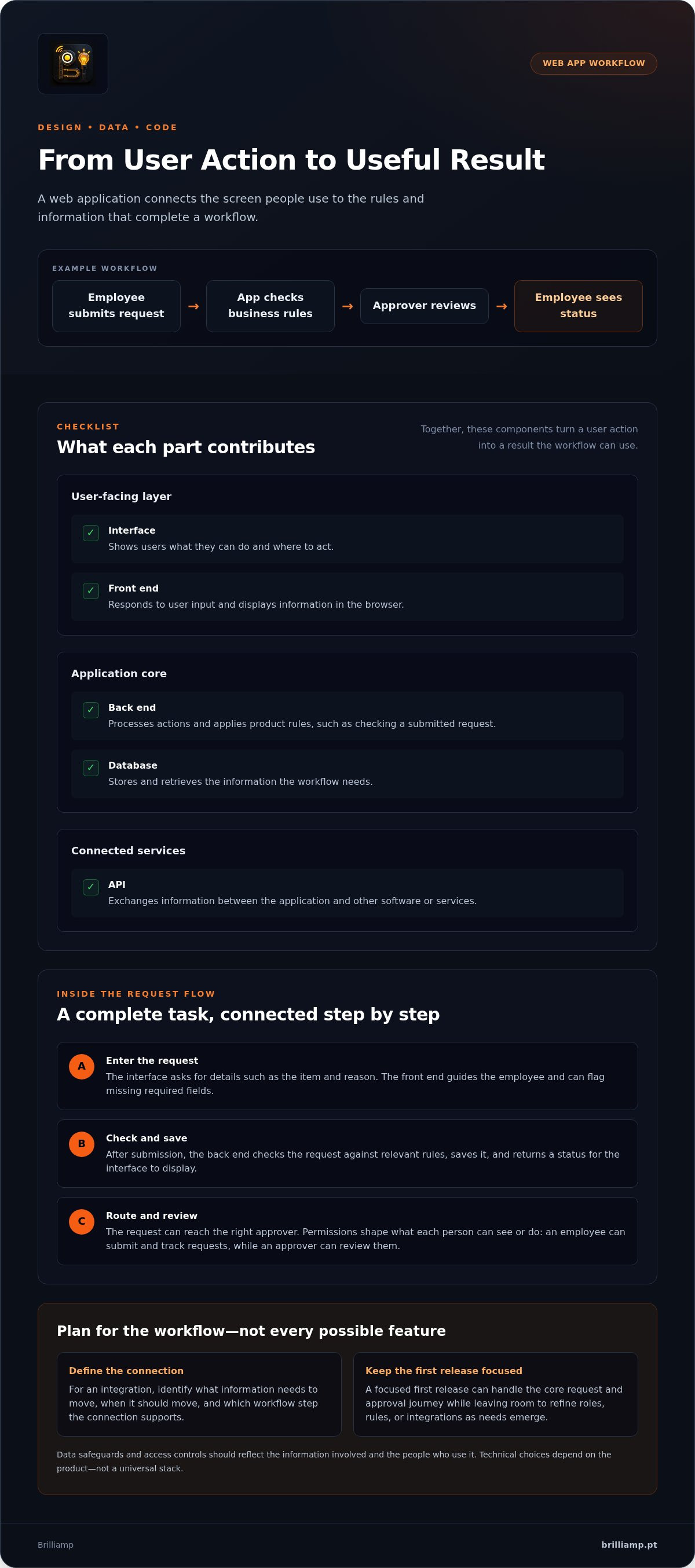
A useful web app makes a complete workflow feel simple. Imagine an employee submitting a purchase request: they enter the details in a clear form, the app checks the information against business rules, and the request reaches the right approver. After review, the employee can see its status. Custom web application development connects each step, from the screen people use to the logic and data working behind it.
Each part has a distinct role. The interface guides the user, and the front end turns that design into an interactive experience in the browser. The back end applies the app’s rules, while the database stores and retrieves information the workflow needs. An API lets the application exchange information with other software or services.
| Component | Purpose |
|---|---|
| Interface | Shows users what they can do and where to act. |
| Front end | Responds to user input and displays information in the browser. |
| Back end | Processes actions and applies product rules. |
| Database | Stores and retrieves workflow information. |
| API | Exchanges information with connected services. |
How do the interface and back end work together?
In the purchase-request example, the interface asks for details such as the item and reason. The front end guides the employee through the form and can show when required fields are missing. After submission, the back end checks the request against relevant rules, saves it, and returns a status for the interface to display.
Authentication establishes who has signed in. Permissions shape what that person can see or do: an employee might submit and track requests, while an approver can review them. Defining these roles helps the app show relevant actions and limit access to information according to each user’s needs.
Where do integrations, security, and scalability fit?
If a request needs to flow into another business system, an API can carry the necessary information between applications. Start by identifying what information needs to move, when it should move, and which step in the workflow the connection supports. Data safeguards and access controls should reflect the information involved and the people who use it.
Plan for change without building every future feature upfront. A focused first release can handle the core request and approval journey, while a well-considered structure leaves room to refine roles, rules, or integrations as needs emerge. The right technical choices depend on the product, not on a universal stack.
Brilliamp brings research-led UI/UX design and engineering together to shape web applications around real workflows. See how web application design and development connects product needs to a working experience.
Custom Web Apps vs. Existing Software: Is It Worth It?
Custom development isn’t automatically the right first move. If an existing tool supports the essential workflow, adopting or configuring it may be more direct. A custom application is worth exploring when the gap between how the work needs to happen and what available software supports repeatedly creates friction.
| Approach | Workflow fit and flexibility | Integrations and responsibility |
|---|---|---|
| Existing tool | Works well when standard features cover the core tasks. | Integration options and product changes depend on the tool; the business manages how it uses it. |
| Configured software | Settings and available options adapt a general product to some specific needs. | Connections and changes are shaped by the software’s capabilities and terms. |
| Custom application | Features, roles, and rules can be shaped around a defined workflow. | Integrations can be designed for the product’s needs, and the business takes on ongoing product responsibility. |
When can an existing tool be the better starting point?
If a standard tool handles the important steps, users can work with it comfortably, and it fits existing operations, a custom build may add little value. Configuration can sometimes close smaller gaps without creating a separate product to maintain.
Sometimes the answer is simpler still: change the process. Clarifying who approves a request or removing an unnecessary handoff might solve the problem before new software is needed. First identify what’s failing, who experiences the friction, and whether a different way of working could improve the outcome.
What signals that a tailored application may fit?
A custom app may be worth exploring when a recurring process breaks across tools, relies on awkward manual workarounds, or needs distinct experiences for different user roles. Specific business rules can also be a factor: a request might need different checks depending on its type or destination. Integration needs are another signal, especially when essential information must move between systems in a way current tools don’t support cleanly.
There’s also a product question. If the way people use a service is part of what makes it distinctive, a tailored experience may help express that difference. Keep the first scope grounded in the essential workflow rather than imagined future features. In custom web application development, project scope depends on needs such as features, roles, rules, and integrations, not on the word “custom” alone.
Custom Web App Project: From Workflow to Launch
A focused project moves from a real user problem to a working product, then uses feedback to guide what comes next. In custom web application development, each stage should answer a practical question: what needs solving, what belongs in the first release, and what should be learned before expanding?
How do discovery and design turn needs into a buildable scope?
Begin with the people who will use the application, the tasks they need to complete, and the points where their current process creates friction. Research and discussion help turn assumptions into a clearer picture of the workflow, so design and engineering can address the same problem.
- Discover the problem. Define the users, their goals, and the workflow that needs improvement.
- Map the journey. Turn findings into user flows, requirements, and interface concepts that show how tasks should work.
- Prototype and prioritise. Use a prototype to explore the experience and test assumptions. Separate the essential launch workflow from features that can wait.
A prototype helps people react to an idea before it becomes a full application. It can reveal confusing steps or missing decisions early. A focused first release then gives the team a practical way to learn whether the core workflow works for users.
What happens during development, testing, and release?
Once the scope is clear, the team builds the application in working increments. Each cycle creates something to review, test, and refine, keeping design intent connected to functional behaviour rather than saving all feedback for the end.
- Build and review. Develop priority features in manageable increments, checking that each supports the agreed user flow.
- Test the experience. Check key workflows, permissions, responsive behaviour across screen sizes, and any integrations the app depends on.
- Launch and learn. Release the first version, then use analytics and user feedback to identify what to improve or develop next.
Launch is a learning point, not a finish line. Observe where users complete tasks smoothly and where they hesitate. Use those signals to guide refinements instead of expanding the product based only on assumptions. For more on architecture decisions as a product evolves, see the planned guide to scalable web application development.
Brilliamp supports web app projects from early priorities through design, development, and launch. Explore Brilliamp’s web app project approach to see how the stages connect.
How Brilliamp Brings a Custom Web Application from Concept to Growth
A strong product journey connects what users need with how the application looks, behaves, and works behind the scenes. Brilliamp brings UI/UX design, custom web application development, and launch support into one collaborative process, shaping the scope around your audience, workflows, and product priorities.
What can end-to-end product development bring together?
Start with the people who will use the product and the tasks they need to complete. Research and discovery help clarify which problems matter most; interface design turns those insights into clear flows and screens. Engineering connects the experience to the application’s rules and data, keeping the product’s intent intact as it becomes a working web app.
Keeping design and development connected helps the team make product decisions in context. A proposed feature can be assessed by how it appears, how it supports the workflow, and how it fits the project’s priorities. The scope can stay focused on the essential experience, with further capabilities shaped as needs become clearer.
Launch support carries the product into release. After launch, analytics and user feedback can help reveal which parts of the experience work smoothly and where people encounter friction. SEO and post-release growth support can also contribute to how the product reaches users and evolves over time. The aim is a considered journey from concept to learning, without assuming every future feature needs to be built at the start.
What is a useful first step for a custom web app idea?
Bring a simple outline of the problem, the intended audience, and the most important workflow. You don’t need a finished feature list or technical plan. A clear example of what a user needs to do, where the current process falls short, and what a better outcome would look like is a useful place to begin.
An initial conversation can clarify the goal, explore product priorities, and shape a project proposal around the need. Brilliamp offers a free consultation and provides a project proposal within 24 hours, giving you a practical basis for assessing the concept and its scope.
Read more about discussing a web app idea with Brilliamp.
Shape the Right Web App Around a Real Need
The best custom web application development starts with a clear user need, not a long feature list. A website shares information; a web app helps people complete tasks. The right choice may be existing software, a process change, or a focused custom product shaped around your workflows.
When a tailored app makes sense, connect research-led design with functional engineering. Start with the essential workflow, test assumptions in a focused first release, then use feedback and analytics to guide what comes next.
Brilliamp brings design, development, and launch support together, with post-release learning to help refine the product. Start with a free consultation and receive a project proposal within 24 hours. Book a free consultation to shape your web app idea.
A useful digital product can start with one clear problem and a conversation about how to solve it.
Frequently Asked Questions
What is custom web application development?
Custom web application development is the design and engineering of an interactive browser-based product shaped around particular users, workflows, and business rules. Unlike a mainly informational website, a web app helps people complete tasks, manage information, or use a service. Its scope can range from a focused customer portal to a larger product. The right scope depends on the need the application must address and what users need to accomplish.
When should a business build a custom web application?
Consider a custom application when important workflows, user roles, or business rules don’t fit existing tools well, and the digital experience matters to the product. First define who the users are, what they need to do, and where the current process falls short. If standard software already handles the essential tasks, test whether a process change or further validation can solve the problem before committing to a build.
Is custom web application development better than off-the-shelf software?
Not always. Existing software can be a practical choice when its features support the essential workflow without major compromises. A tailored application may fit better when distinctive processes, integrations, or user experiences are central to the product. Compare workflow fit, flexibility, integration needs, and the responsibility of evolving the product after launch. Custom development is a way to solve a specific problem, not a goal in itself.
How does custom web application development work?
A typical project starts by clarifying users, goals, and workflows. The team turns those findings into requirements and interface concepts, then builds and reviews working parts of the application. Testing checks key journeys, permissions, and integrations before release. After launch, analytics and user feedback can help guide improvements. The exact scope and sequence depend on the product, its users, and the assumptions the project needs to test.
Can a custom web application grow as a business grows?
Yes, a custom application can be designed to adapt, but growth still calls for future decisions. A sound foundation and clear boundaries can make it easier to refine workflows as usage and requirements change. Start with the needs you can validate now, then use product evidence to guide expansion. Planning for growth doesn’t mean building every possible feature upfront; it means leaving room to make informed changes later.
What should I prepare before discussing a custom web app project?
Prepare a short description of the problem, the people experiencing it, and the most important task the application should support. It also helps to note how the process works today, which tools are involved, and what a better outcome would look like. You don’t need a finished specification. Brilliamp offers a free consultation and provides a project proposal within 24 hours, shaped around the project’s needs.


